Obsidian second brain
A second brain is a vault, not an app.
The application is just the editor. The brain is what sits on disk: notes with real names, links between them, and one entry point you come back to every day.
Free. Unsubscribe anytime.
01
Capture
Journal/2026/08
02
Process
Template/Daily Journal.md
03
Connect
[[wikilinks]]
04
Retrieve
graph · search
The definition
Four moves, repeated until it holds.
Most vaults fail at capture or at retrieval, and rarely in the middle. Notes arrive faster than they get processed, and the graph fills with pages nobody opens a second time.
The fix is a fixed route: capture into one place, process it the next morning, connect it while the context is still fresh, and keep a small set of entry points that lead back in.
None of it needs a plugin, a database or a custom schema. Folders and wikilinks are enough, provided the route is the same every day.
The test: pick a topic you have not touched in a month and find it in two hops.
In practice
What a processed day looks like.
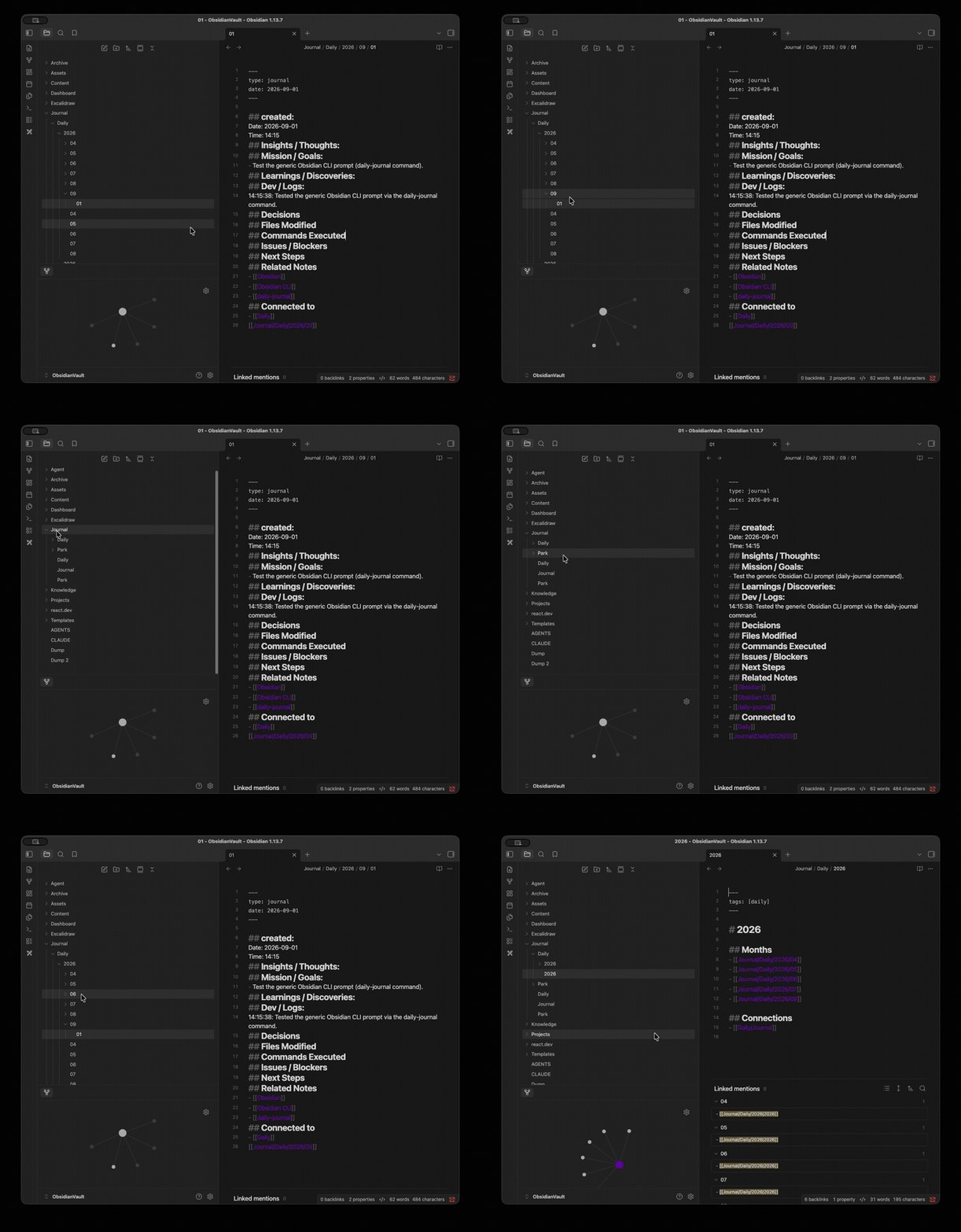
One daily note after a single pass: what was decided, which files moved, what broke, and what happens next. The sections are always the same, so a search for a decision is a search for a heading.
The template
Every day gets the same five headings.
The template is the structure, not decoration. Because the headings never change, last week's note and next month's note can be read the same way, and an agent can fill them without inventing a format.
{{date}}
Today's Focus
- one line: what today is for
Notes
- what happened, in the order it happened
Tasks
- - [ ] test the daily note template
- - [x] connect project instructions
End of Day
- - What did I complete?
- - What is still open?
Related Notes
- [[2026/08/01]] · [[CLAUDE/Skills]]
On disk
The whole system is five folders.
None of it needs a plugin. CLAUDE holds the rules the agent reads, Journal holds one file per day under the year and month, Template holds the note each day is built from, and Content holds what gets published.
- AI-Knowledge-Base/vault root
- CLAUDE/rules the agent reads
- CLAUDE.mdentry point
- Commands/Journal.md
- Skills/Daily Journal.md
- Config/auto-memory/MEMORY.md
- Journal/one file per day
- 2026/08/01.md · 02.md · 03.md
- Template/Daily Journal.md
- Content/Transcripts/
The agent side
A session ends by writing the note.
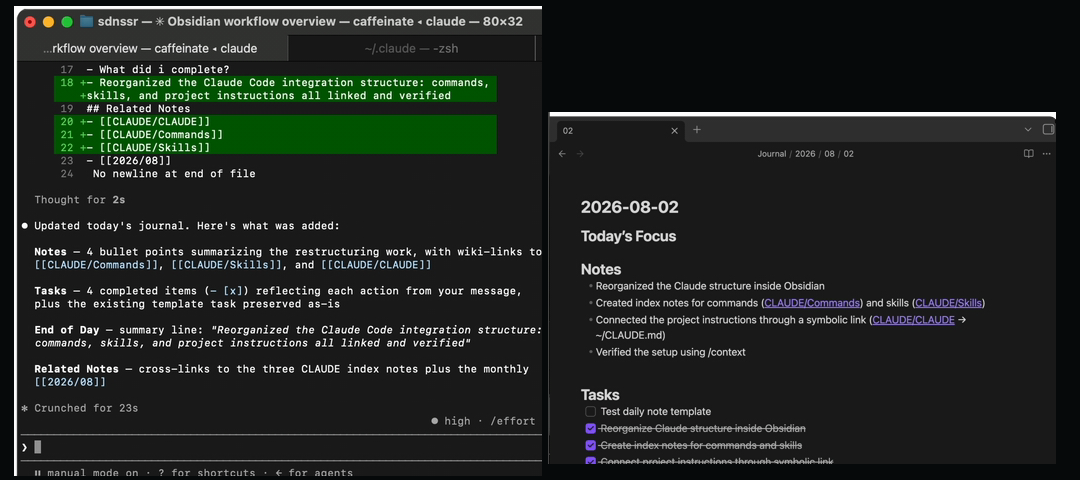
The terminal on the left and the note on the right are the same moment. Claude Code finishes the task, then appends what changed to today's file, with links to the commands and skills it used.
One line
From a capture to a note you can find.
A line arrives raw. Processing rewrites it with enough context to be useful next week, then connects it to the file or project it belongs to. Three steps, and none of them are optional.
01 · capture
same day
retry flaky ci test twice
02 · process
next morning
CI: retry a failing test twice, then fail loud
03 · link
while writing
[[ci.yml]] · [[Commands/Journal]]
Retrieval
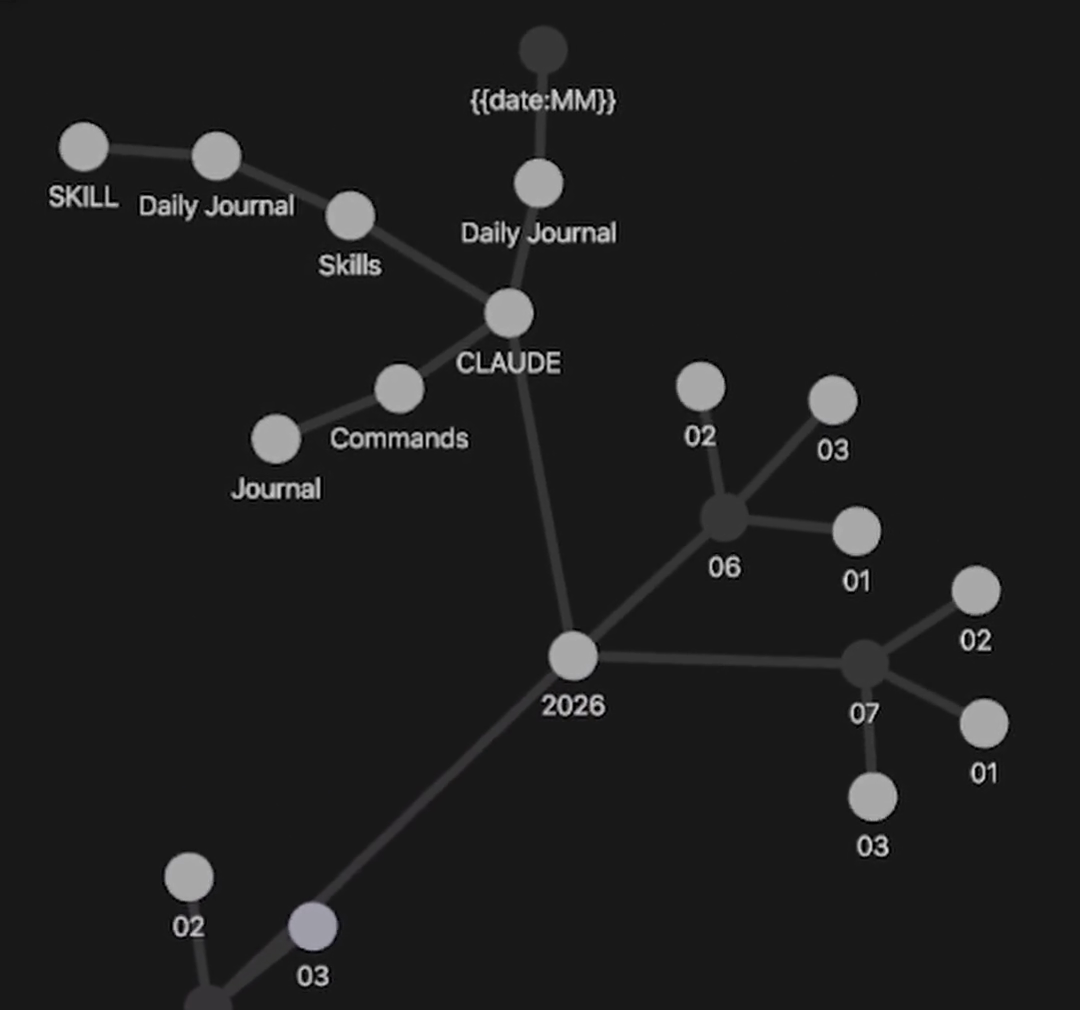
The graph shows what is reachable.
This is the real vault. Daily notes hang off the year, commands and skills hang off CLAUDE, and memory notes sit at the edge. A note with no edges is the one you will never open again.
Structure
From a captured line to a note you can find.
Each step has one job and one place. When a step borrows another step's job, the vault stops being a system and turns into a folder of good intentions.
- 01
Capture
Journal/2026/08
Every dayEverything that arrives during the day is written into that day's file as it happens. No sorting at capture time, because sorting is the thing that stops capture.
- 02
Process
Template/Daily Journal.md
Next morningThe template decides which headings exist: what got decided, which files moved, what broke, what comes next. Processing means filling those headings, not inventing new ones each day.
- 03
Connect
[[links]]
While writingA note earns a link to a project, a person or another note. Links are what make the vault searchable by association instead of by filename.
- 04
Retrieve
graph · search
When neededThe graph is the index of last resort. A note that cannot be reached from a daily note or a project is effectively lost, even though the file is still there.
The order matters more than the tooling. Capture without processing is a bigger inbox, and processing without links is a second inbox in a different folder.
Failure modes
Why vaults stop being used.
- 01
A vault that only takes notes
Capture is the easy half. Without a processing step the inbox grows until it becomes the mess you were trying to escape, and opening it starts to feel like a chore.
- 02
Folders instead of links
A deep folder tree sorts a note once. A link keeps it reachable from every project that touches it, which is the only kind of reachability that survives time.
- 03
Tooling before structure
Themes, plugins and dashboards are a comfortable way to avoid writing the note. Get the route working in five folders first, then decorate it.
See it running
The vault, built on camera.
The long-form walkthrough starts from an empty vault. The shorts cover one move at a time.
Get the next system.
One message when a new breakdown is published, with the files from it.